

Your own data in the admin
Goal: keep a list of the shops that sell Clay & Kiln pieces (the stockists), edit it in the admin, and show it on the site at /shop/stockists.
Who this is for: Rust developers who build a site with Rustango-CMS.
Time: about 25 minutes.
This is a developer chapter of Build a ceramics shop, step by step. All code is in examples/ceramics_shop/stockists.rs and examples/ceramics_shop/models.rs.
Pages or your own table?
Products are pages: each one has a URL, a draft and a live version, translations. A stockist is different. It is a row of data — a name, a city, a website — that other pages show. For data like this, use your own table and give editors a screen for it in the admin.
| You need… | Use |
|---|---|
| A list of records with a form to add, edit and delete them | #[derive(CmsAdmin)] on your model |
| A screen that does one job: an import, a report, a button that runs a task | AdminPageHandler + register_admin_page! |
| Extra URLs under a page, filled from your table | routes, route_context and route_outcome on the page type |
The model and its editor
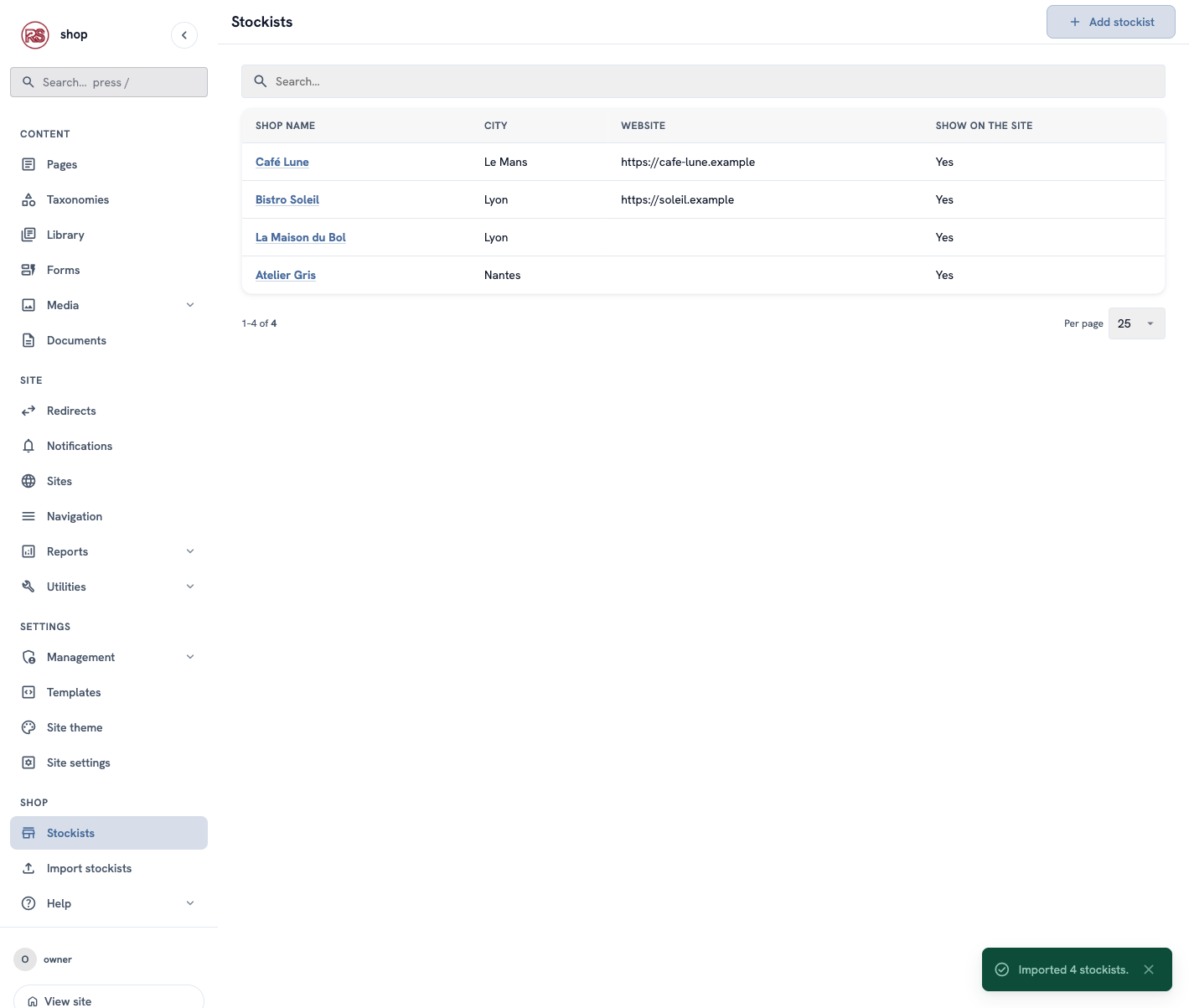
One derive gives the whole screen above — the list, the search box, the Add stockist button and the form:
#[derive(rustango::Model, rustango_cms::CmsAdmin, Debug, Clone, Serialize, Deserialize)]
#[rustango(table = "shop_stockist", app = "shop", display = "name")]
#[cms_admin(
    label = "Stockists",
    singular = "stockist",
    slug = "stockists",
    icon = "store",
    section = "Shop",
    list = "name, city, website, is_active",
    search = "name, city",
    ordering = "city, name"
)]
pub struct Stockist {
    #[rustango(primary_key)]
    pub id: Auto<i64>,
    #[rustango(max_length = 120)]
    #[field(widget = Text, label = "Shop name", required, max_length = 120)]
    pub name: String,
    #[rustango(max_length = 80)]
    #[field(widget = Text, label = "City", required, max_length = 80)]
    pub city: String,
    #[rustango(max_length = 200, default = "''")]
    #[field(widget = Url, label = "Website", placeholder = "https://")]
    pub website: String,
    #[field(widget = MediaPicker, label = "Photo")]
    pub photo: Option<i64>,
    #[rustango(default = "true")]
    #[field(widget = Boolean, label = "Show on the site")]
    pub is_active: bool,
}
The #[field(...)] attributes are the same ones page types use, so every widget works here too: text, numbers, dates, choices, the image chooser, the page chooser. A field without #[field] (here id) is not on the form.
The model also needs Default — a new record starts from it — and an impl CmsAdminOverrides. The stockist's Default sets is_active: true, so the Show on the site box starts ticked.
The #[cms_admin(...)] options
| Option | Default | What it does |
|---|---|---|
label | required | The plural name: the sidebar link and the list heading. |
singular | the struct name in words | Used in "Add stockist" and in messages. |
slug | the table name | The screen's address: /cms-admin/x/stockists. |
icon | none | A Material Symbols name for the sidebar. |
section | Tools | The sidebar group. content, site and settings are the built-in groups; any other name makes a new group. |
sort_order | 100 | The order inside the group. |
list | admin(list_display), else the first three fields | The list columns. The first column links to the form. |
search | admin(search_fields) | Text fields the search box looks in. No search fields, no search box. |
ordering | admin(ordering), else the primary key | The list order. -name sorts backwards. |
form | the order of the fields | The order of the boxes on the form, for example form = "name, city, website". |
per_page | 25 | Rows on each list page. Editors can change it below the list. |
permission | the table name | The name of the screen's row in Roles (see below). |
title | display, else #<id> | The field that names a record in headings and messages. |
Who can use it
The screen adds a row to the role matrix in Management → Roles, named by permission (here shop_stockist), with four boxes:
| Box | Allows |
|---|---|
| view | Opening the list and the forms. Without edit, the form is read-only and has no Save button. |
| add | Add stockist. |
| edit | Save on an existing stockist. |
| delete | The Delete button. |
Superusers can do everything. The check runs on the server for every request, so hiding a button is not the only protection.
Make the table
As for any model, generate the migration and run it:
cargo run --example ceramics_shop -- makemigrations
cargo run --example ceramics_shop -- migrate-tenants
If makemigrations says the chain has branched, the CMS has new migrations since your last one. Run makemigrations --merge once, then makemigrations again.
Rules: CmsAdminOverrides
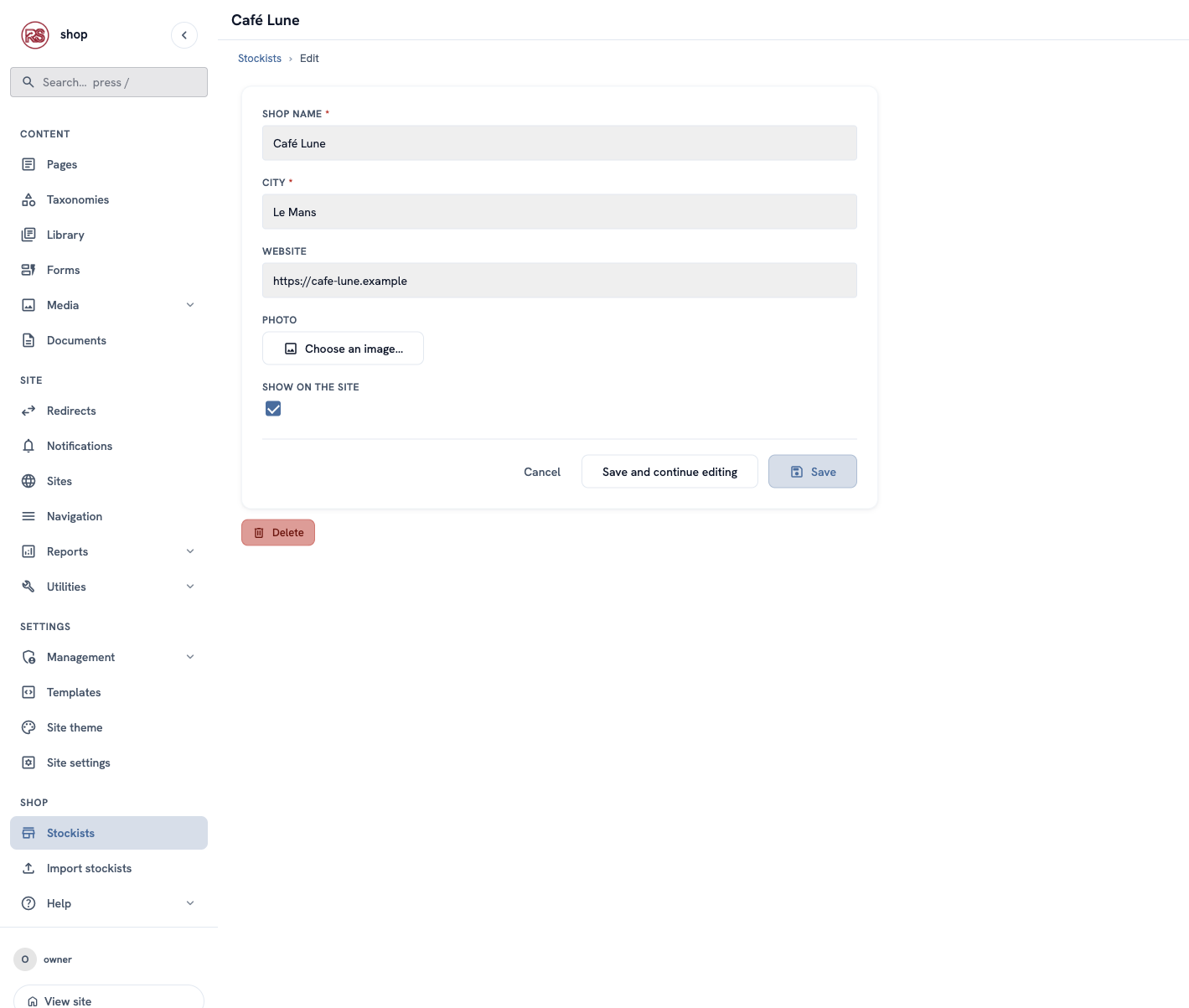
Every method has a default, so impl CmsAdminOverrides for Stockist {} is enough to start. The stockist only checks the website:
#[async_trait]
impl CmsAdminOverrides for Stockist {
    async fn validate(&self, _pool: &Pool) -> Vec<FieldError> {
        if bad_website(&self.website) {
            return vec![FieldError::new("website", "Start the address with https://")];
        }
        Vec::new()
    }
}
When validate returns errors, nothing is saved: the form comes back with the editor's text and the message under the field. A value that does not parse (letters in a number box) and an empty required box are checked before validate, with no code.
| Method | Default | Use it to… |
|---|---|---|
validate(&self, pool) | no errors | Check values: a format, a unique name, a link between two fields. Use FieldError::new("_form", …) for a message about the whole form. |
read_only_fields(&self, pool) | none | Show some fields without letting editors change them, for example fields another system fills. |
can_create(pool) | true | Hide Add and refuse new records. |
can_delete(&self, pool) | true | Hide Delete for some records. |
field_options(pool, field) | the declared options | Fill a Select, Radio, Checkboxes or MultiSelect box from the database — for example a list of another table's rows for a foreign key. |
extra_widgets(&self, pool) and save_extra(&self, pool, form) | none | Boxes for data that is not a column of the table, such as a many-to-many list, and storing what they post. |
after_save(&self, pool, created) | nothing | Do something after a save: clear a cache, send a message. |
before_delete(&self, pool) | nothing | Remove or update dependent rows. An error cancels the delete. |
list_column(pool, rows, column) | the field's value | Fill a list column with something computed, for all rows of the page at once. The column name does not have to be a field. |
A many-to-many list
Suppose each stockist sells some of the clay types from the Clay vocabulary. There is no column for this — the links live in their own table — so the form gets an extra box, and save_extra stores it:
async fn extra_widgets(&self, pool: &Pool) -> Vec<Widget> {
    let chosen: Vec<String> = clay_ids_for(pool, self.id.get().copied()).await
        .iter().map(ToString::to_string).collect();
    vec![Widget::new(WidgetKind::Checkboxes, "clays", "Clay types")
        .with_options(all_clays(pool).await)            // (id, name) pairs
        .with_value(serde_json::to_string(&chosen).unwrap_or_default())]
}

async fn save_extra(&self, pool: &Pool, form: &AdminForm) -> Result<(), ExecError> {
    // A checkbox list posts a JSON array of the ticked values.
    let Some(raw) = form.get("clays") else { return Ok(()) };
    let ids: Vec<String> = serde_json::from_str(raw).unwrap_or_default();
    replace_clay_links(pool, self.id.get().copied(), &ids).await
}
save_extra runs after the record is saved, so self already has its id. clay_ids_for, all_clays and replace_clay_links are your own small queries.
A computed column
list_column gets the rows of the current list page, so one query covers them all. To show how many products each stockist sells, from a links table:
async fn list_column(pool: &Pool, rows: &[Self], column: &str) -> Option<Vec<String>> {
    if column != "products" {
        return None; // the other columns keep their values
    }
    let counts = product_counts(pool).await; // one query: stockist id → count
    Some(rows.iter().map(|r| {
        let id = r.id.get().copied().unwrap_or_default();
        counts.get(&id).copied().unwrap_or(0).to_string()
    }).collect())
}
and add products to list = "…".
Avoid N+1 queries. Never run one query per row inside
list_column.
A screen of your own: Import stockists
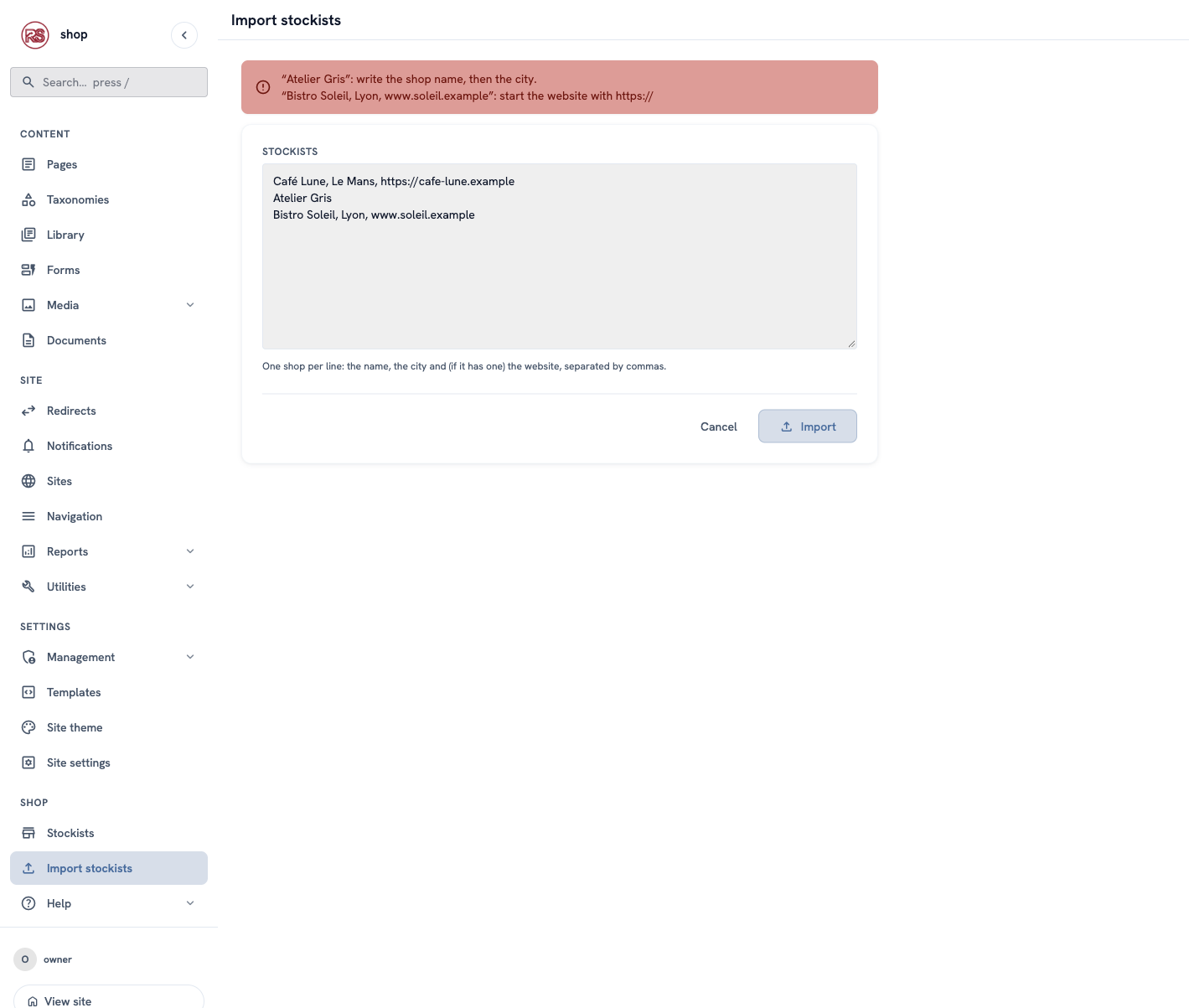
Some jobs are not "a list and a form". The shop owner gets a list of new stockists by email and wants to paste it in one go. That is a custom admin page: a struct that implements AdminPageHandler, registered with register_admin_page!. It lives at /cms-admin/x/<slug> and gets the admin's sidebar, header, colours and messages.
#[derive(Default)]
pub struct StockistImport;

#[async_trait]
impl AdminPageHandler for StockistImport {
    fn slug(&self) -> &'static str { "stockist-import" }
    fn label(&self) -> &'static str { "Import stockists" }
    fn icon(&self) -> Option<&'static str> { Some("upload") }
    fn section(&self) -> SidebarSection { SidebarSection::Custom("Shop") }
    fn sort_order(&self) -> i32 { 110 }
    fn permission_resource(&self) -> Option<&'static str> { Some("shop_stockist_import") }

    async fn render(&self, ctx: AdminPageCtx<'_>) -> Response {
        let mut tctx = tera::Context::new();
        tctx.insert("lines", "");
        tctx.insert("errors", &Vec::<String>::new());
        ctx.render("stockist_import.html", &mut tctx).await
    }

    async fn post(&self, ctx: AdminPageCtx<'_>, form: AdminForm) -> Response {
        let lines = form.text("lines");
        // … parse each line into a Stockist; on errors, render the form again
        //   with `lines` and the messages …
        let pool = ctx.tenant.pool();
        let mut added = 0;
        for mut stockist in parsed {
            if let Err(e) = stockist.save(pool).await {
                return ctx.redirect(&ctx.page_url(), MessageLevel::Error, &format!("Stopped after {added}: {e}"));
            }
            added += 1;
        }
        let noun = if added == 1 { "stockist" } else { "stockists" };
        ctx.redirect("/cms-admin/x/stockists", MessageLevel::Success, &format!("Imported {added} {noun}."))
    }
}

rustango_cms::register_admin_page!(StockistImport);
render answers a GET, post answers a form sent to the page. Before post runs, the CMS has checked that the editor is signed in, that the form's security token is right, and that the editor's role allows it. You write only the job.
What AdminPageCtx gives you
| Part | What it is |
|---|---|
ctx.render(template, &mut context) | Shows your template inside the admin. It adds the sidebar (with your page marked), the signed-in user, the admin colours and language, csrf_token, and the messages waiting to be shown. |
ctx.redirect(url, level, message) | Goes to url and shows message there. level is MessageLevel::Success, Info, Warning or Error. |
ctx.query(), ctx.query_param("q") | The query string: ?q=lyon → Some("lyon"). |
ctx.action | The part of the address after the slug: /cms-admin/x/stockist-import/preview → Some("preview"). One page can answer several addresses this way. |
ctx.has_perm("shop_stockist.add") | Whether the editor's role has a permission. |
ctx.tenant.pool() | The site's database. |
ctx.user | The signed-in user. |
ctx.page_url() | /cms-admin/x/<slug>. |
Reading the form: AdminForm
| Method | Gives |
|---|---|
form.get("name") | The value as sent, or None. |
form.text("name") | The value without spaces at the ends; empty if missing. |
form.opt_text("name") | The same, but None when empty. |
form.int("qty"), form.float("price") | A number, or None. |
form.checked("agree") | true for a ticked checkbox. |
form.all("tag"), form.ints("id") | Every value of a name that appears many times. |
Who can use it
permission_resource() adds a row to Management → Roles with view and edit: view opens the page, edit may send its form. To ask for add or delete instead, return them from permission_actions() and send the form to /cms-admin/x/<slug>/new or /cms-admin/x/<slug>/delete.
Without permission_resource(), any editor who can use the admin can use the page.
The template
The template extends the admin's base and uses the admin's own classes, so it looks like every other screen. Part of templates_admin/stockist_import.html:
{% extends "rcms_admin/_base.html" %}
{% block heading %}Import stockists{% endblock %}
{% block content %}
<form method="post" action="/cms-admin/x/stockist-import" class="rcms-card rcms-maxw-760">
    {{ csrf_token | csrf_input | safe }}
    <div class="rcms-field">
        <label for="lines">Stockists</label>
        <textarea id="lines" name="lines" rows="10">{{ lines }}</textarea>
    </div>
    <div class="rcms-form-actions">
        <button type="submit" class="rcms-btn">Import</button>
    </div>
</form>
{% endblock %}
A template that extends rcms_admin/_base.html can only be added after the admin's templates. Keep it out of your public templates/ folder and add it in main:
rustango_cms::admin::register_templates(&mut tera)?;
tera.add_raw_template("stockist_import.html", include_str!("templates_admin/stockist_import.html"))?;
Show the stockists on the site
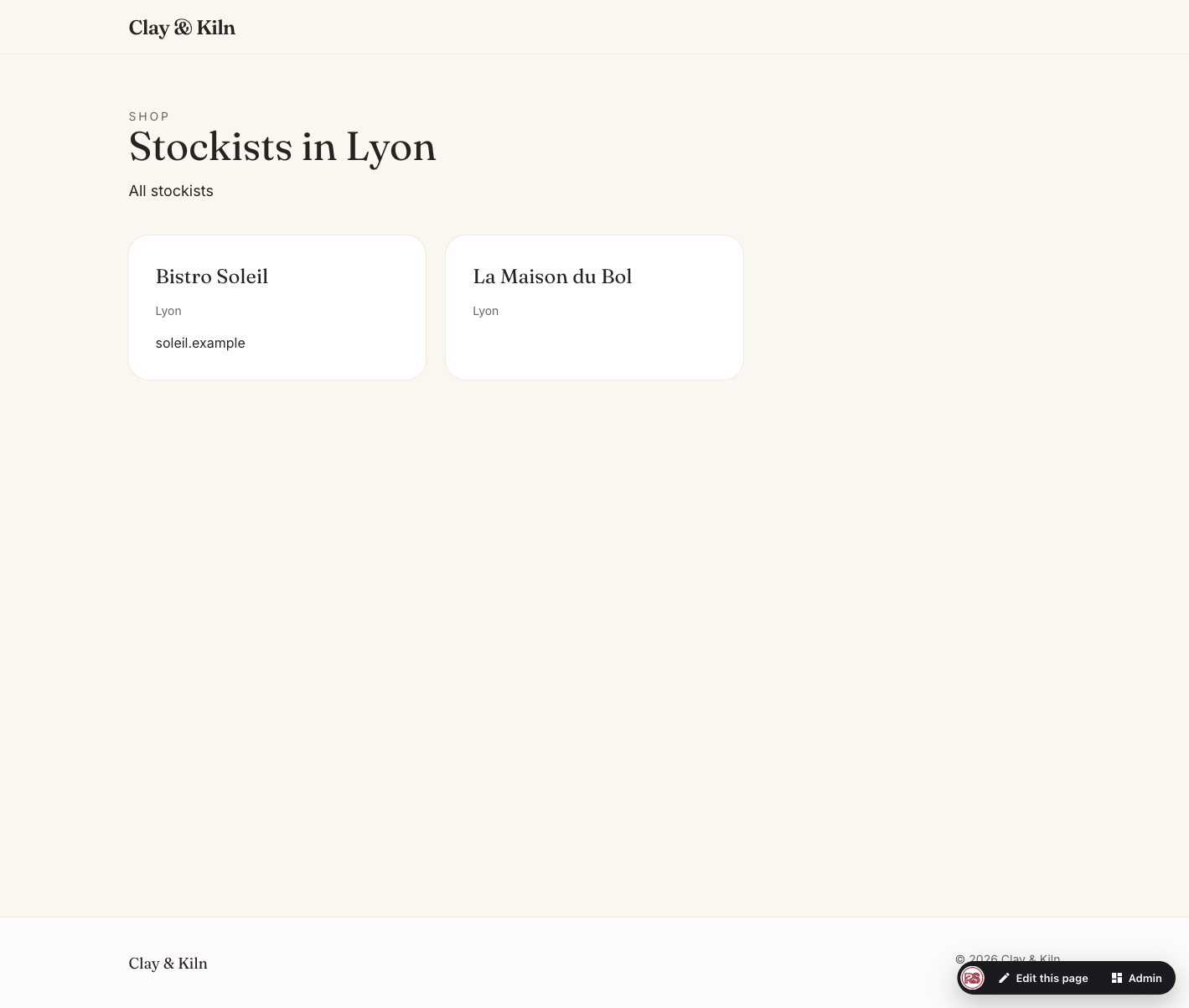
The shop page answers two more addresses: /shop/stockists and /shop/stockists/<city>. Three methods of its PageTypeOverrides do this:
fn routes(&self) -> Vec<RouteSpec> {
    vec![
        RouteSpec::new(r"stockists", "stockists"),
        RouteSpec::new(r"stockists/(?P<city>[a-z0-9-]+)", "stockists_in_city"),
    ]
}

async fn route_context(&self, pool: &Pool, _page: &Page, matched: &RouteMatch)
    -> Result<Map<String, Value>, ExecError>
{
    let mut stockists = crate::stockists::active(pool).await;
    let mut ctx = Map::new();
    if let Some(city) = matched.captures.get("city") {
        stockists.retain(|s| &s.city_slug() == city);
        if let Some(first) = stockists.first() {
            ctx.insert("city".to_owned(), json!(first.city));
        }
    }
    // Each row also carries its city as it appears in URLs (`le-mans`).
    let rows: Vec<Value> = stockists.iter().map(|s| {
        let mut row = json!(s);
        row["city_slug"] = json!(s.city_slug());
        row
    }).collect();
    ctx.insert("stockists".to_owned(), Value::Array(rows));
    Ok(ctx)
}

fn route_outcome(&self, matched: &RouteMatch, route_ctx: &Map<String, Value>) -> RouteOutcome {
    if matched.name == "stockists_in_city" && !route_ctx.contains_key("city") {
        return RouteOutcome::NotFound;
    }
    RouteOutcome::Template("stockists.html".to_owned())
}
| Method | What it does |
|---|---|
routes() | The extra addresses, as patterns under the page's own address. Named groups like (?P<city>…) arrive in matched.captures. |
route_context(…) | The data for the template, for the address that matched. |
route_outcome(matched, route_ctx) | What to answer, after route_context: RouteOutcome::Render (the page's own template, the default), RouteOutcome::Template("…") (another template), or RouteOutcome::NotFound. |
NotFound gives the visitor the site's normal 404 page with the status code 404, so search engines do not keep /shop/stockists/paris when Paris has no stockist.
Add to page
The shop page links to the list: "Find us in 4 shops". The number comes from public_context:
async fn public_context(&self, pool: &Pool, _page: &Page) -> Result<Map<String, Value>, ExecError> {
    let mut ctx = Map::new();
    let count = crate::stockists::active(pool).await.len();
    ctx.insert("page".to_owned(), json!({ "stockist_count": count }));
    Ok(ctx)
}
Keys under "page" join the page's own, so the template writes {{ page.stockist_count }} next to {{ page.title }}. They only add: a key the page already has (title, url_path…) keeps the page's value.
Check it worked
Start the shop and sign in:
- The sidebar has a Shop group with Stockists and Import stockists.
- Paste
Atelier Grison the import screen: the screen shows an error and keeps your text. - Paste
Café Lune, Le Mans, https://cafe-lune.example: the list opens with "Imported 1 stockist." - Open
/shop/stockistsand/shop/stockists/le-manson the site;/shop/stockists/parisis the 404 page. - In Management → Roles, the Stockists row has view, add, edit and delete boxes.
If something goes wrong
| Problem | What to do |
|---|---|
| The screen is not in the sidebar. | Name the type once in main: let _ = std::any::type_name::<rustango_cms::CmsAdminPage<stockists::Stockist>>(); (and the same for an AdminPageHandler), rebuild and restart. |
no such table: shop_stockist | Run makemigrations and migrate-tenants. |
The compiler says CmsAdminOverrides is not implemented. | Add impl rustango_cms::CmsAdminOverrides for Stockist {}. |
The compiler says Default is not implemented. | Derive or write Default for the model. |
Template 'rcms_admin/_base.html' not found at start. | The admin template is in the public templates/ folder. Move it out and add it after register_templates (see "The template"). |
| An extra address shows the page itself, not your template. | route_outcome returned Render. Return RouteOutcome::Template("…"). |
Next
Back to the list of chapters.